ip
Solana - User Guide
Solana is a desktop application for managing tasks, optimized for use via a Command Line Interface (CLI).
- Quick start
- Features
- Viewing the help page:
help - Adding a Todo task:
todo - Adding a Deadline task:
deadline - Adding an Event task:
event - Listing all tasks:
list - Deleting a task:
delete - Marking a task as done:
mark - Marking a task as undone:
unmark - Finding a task:
find - Saving the data
- Editing the data file
- Exiting the program:
bye
- Viewing the help page:
- Command summary
Quick start
- Ensure you have Java
11or above installed in your computer. - Download the latest
solana.jarfrom here. - Copy the file to the folder you want to use as the home folder.
- Open a command-line interface and navigate to the home folder. You should see the
solana.jarfile. - Type
java -jar solana.jarto run the program. The startup interface similar to the below should appear in a few seconds.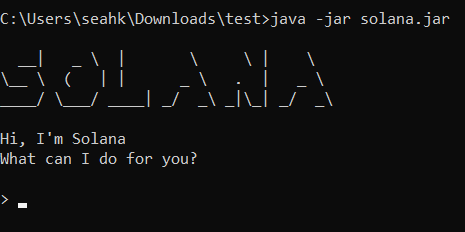
- Type the command and press Enter to execute it. e.g typing
helpand pressing Enter will show the help page. Some example commands you can try:list: Lists all current tasks.todoborrow book: Adds a Todo task namedborrow bookto the task list.mark1: Marks the first task in the task list as done.delete2: Deletes the second task in the task list.bye: Exits the program.
- Refer to the Features below for details of each command.
Features
Words in[SQUARE_BRACKETS]are the parameters.
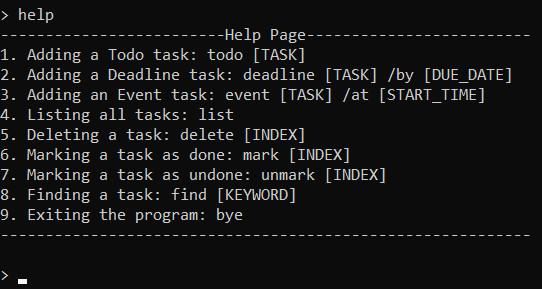
Viewing the help page: help
Lists the help page, which displays all the supported commands and their formats.
Format: help
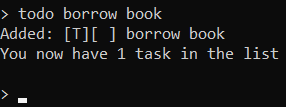
Adding a Todo Task: todo
Adds a Todo task to the task list. Todo tasks are tasks without any date or time attached to it.
Format: todo [TASK]
Examples:
• todo borrow book
• todo buy groceries
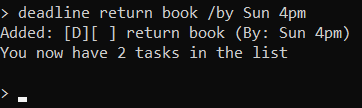
Adding a Deadline task: deadline
Adds a Deadline task to the task list. Deadline tasks are tasks that need to be done by a specific date or time.
Format: deadline [TASK] /by [DUE_DATE]
Examples:
• deadline return book /by Sun 4pm
• deadline submit assignment /by 4/3/2022
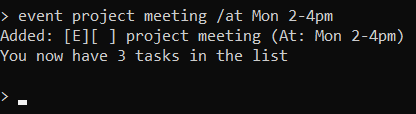
Adding an Event task: event
Adds an Event task to the task list. Event tasks are tasks that start and end at a specific time.
Format: event [TASK] /at [START_TIME]
Examples:
• event project meeting /at Mon 2-4pm
• event lecture /at Fri 4/3/2022 3-5pm
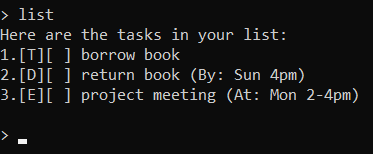
Listing all tasks: list
Shows a list of all current tasks in the task list.
Format: list
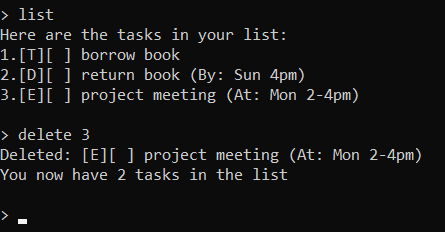
Deleting a task: delete
Deletes a task from the task list.
Format: delete [INDEX]
Deletes the task at the specified index. The index refers to the task number shown using the list command.
Examples:
• delete 3
• delete 1
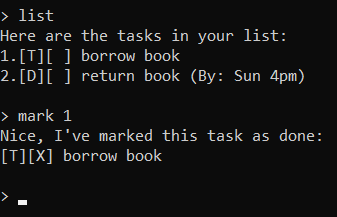
Marking a task as done: mark
Marks a task in the task list as done.
Format: mark [INDEX]
Marks the task at the specified index. The index refers to the task number shown using the list command.
Examples:
• mark 1
• mark 3
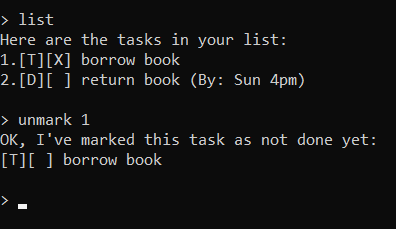
Marking a task as undone: unmark
Marks a task in the task list as undone.
Format: unmark [INDEX]
Unmarks the task at the specified index. The index refers to the task number shown using the list command.
Examples:
• unmark 1
• unmark 3
Finding a task: find
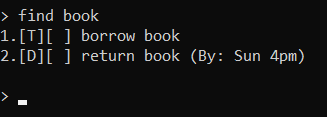
Finds a task in the task list based on the specified keyword(s).
Format: find [KEYWORD]
Examples:
• find book
• find zoom meeting
Saving the data
Task data is saved in the hard disk automatically after any command that modifies the task list.
There is no need to save manually.
Editing the data file
Tasks data is saved as a text file at[home folder]/data/savedTasks.txt. Users are welcome to update data directly by
editing that data file. However, ensure that the format is consistent.
Exiting the program: bye
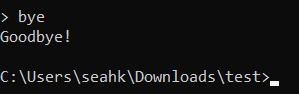
Terminates the program.
Format: bye
Command Summary
| Action | Format, Examples |
|---|---|
| Help | help |
| Todo | todo [TASK] e.g todo borrow book |
| Deadline | deadline [TASK] /by [DUE_DATE] e.g deadline return book /by Sun 4pm |
| Event | event [TASK] /at [START_TIME] e.g event project meeting /at Mon 2-4pm |
| List | list |
| Delete | delete [INDEX] e.g delete 3 |
| Mark | mark [INDEX] e.g mark 1 |
| Unmark | unnmark [INDEX] e.g unmark 1 |
| Find | find [KEYWORD] e.g find book |
| Exit | bye |